







HDD vs SSD: Which Storage Is Better for Your Computer?
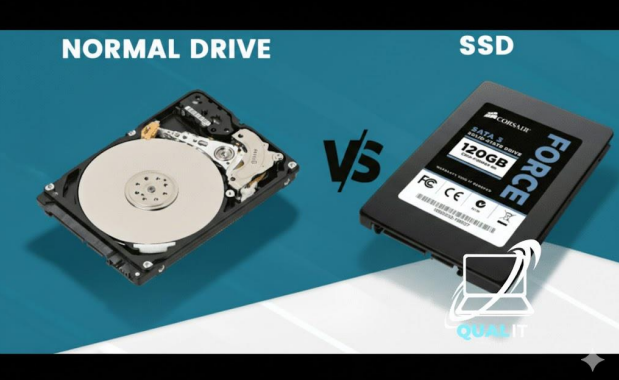
SSDs are much faster, quieter, and more durable, making them ideal for gaming, everyday computing, and laptops. HDDs are cheaper and offer larger storage capacities, making them better for backups and mass file storage. If you want speed, choose SSD. If you want maximum space for the lowest price, choose HDD. Many users benefit most from using both.
Understanding HDDs and SSDs
When choosing storage for your computer, the decision often comes down to Hard Disk Drives (HDDs) versus Solid State Drives (SSDs). Both store your operating system, programs, and files, but they work very differently.
An HDD is a traditional storage device that uses spinning magnetic disks and a moving read/write arm to access data. Because of these moving parts, HDDs are slower and more prone to physical wear over time. However, they remain popular because they provide large storage capacities at a low cost per gigabyte.
An SSD, on the other hand, uses flash memory with no moving parts. This allows it to access data almost instantly, dramatically improving boot times, file transfers, and application loading speeds. SSDs are also more resistant to physical shock and vibration.
Speed and Performance
The biggest advantage of SSDs is speed. An SSD can boot an operating system in seconds, while an HDD may take significantly longer. Programs open faster, games load quicker, and overall system responsiveness improves.
Because HDDs rely on mechanical movement, they experience delays known as latency while the drive spins and positions the read head. SSDs eliminate this delay entirely, delivering consistent high-speed performance.
For gaming, video editing, or multitasking, an SSD can make your computer feel dramatically faster even if the rest of the hardware stays the same.
Capacity and Price
HDDs dominate when it comes to affordable storage space. You can get multi-terabyte HDDs for a relatively low price, making them ideal for storing large media libraries, backups, and archived files.
SSDs have become cheaper in recent years, but high capacity models still cost more than HDDs of the same size. For budget conscious users who need lots of storage, HDDs remain a practical choice.
Durability and Reliability
Because HDDs contain spinning parts, they are more vulnerable to drops, bumps, and wear. This makes them less suitable for laptops or portable use.
SSDs have no moving components, making them more durable and energy efficient. They also generate less heat and operate silently, improving overall system reliability.
Which One Should You Choose?
Choose an SSD if you want:
- Faster boot and load times
- Better gaming performance
- Quiet operation
- Improved laptop battery life
Choose an HDD if you want:
- Maximum storage capacity
- Lower cost per gigabyte
- A drive mainly for backups or media
For many users, the best solution is a combination: an SSD for the operating system and important programs, plus an HDD for large files and storage.
Summary
HDDs and SSDs serve different purposes. SSDs deliver speed, durability, and responsiveness, making them the best choice for modern computing and gaming. HDDs provide affordable high capacity storage for files that don’t need fast access. Understanding your needs speed versus space will help you choose the right storage solution for your computer.
